System design
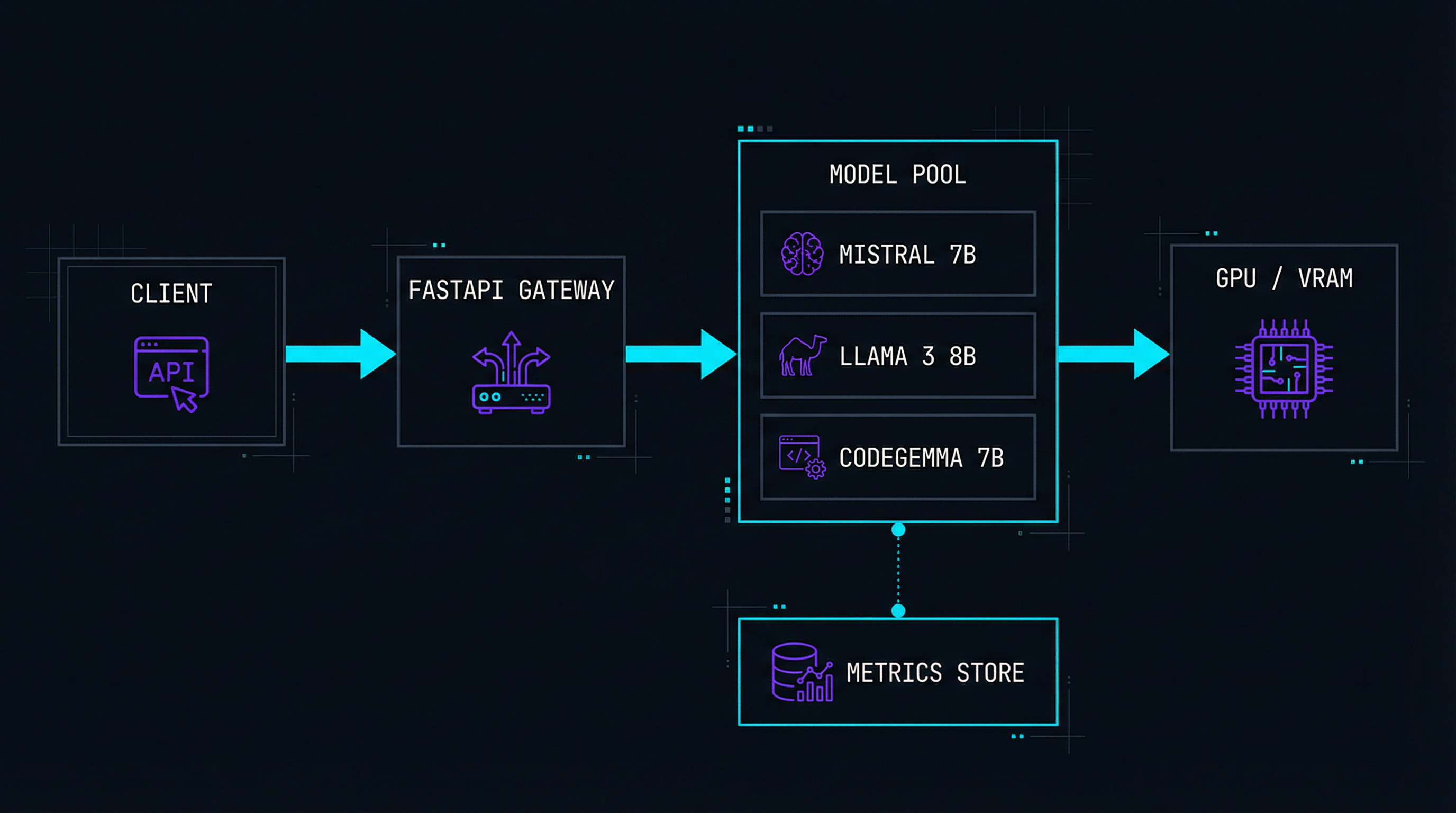
The gateway exposes an OpenAI-compatible API. Models are loaded into a managed pool with automatic memory allocation. Requests are queued and routed to the optimal model instance. Streaming responses use Server-Sent Events for token-by-token output.
Benchmarks on RTX 4070
What Cortex does
OpenAI-Compatible API
Drop-in replacement. Change one URL and your existing code works with local models.
Streaming Responses
Token-by-token output via SSE. No waiting for full generation to complete.
Model Manager
Download, convert, and swap models from HuggingFace with a single CLI command.
Auto Quantization
Convert FP16 models to 4-bit or 8-bit GGUF on the fly. Fit big models in small VRAM.
Live Benchmarking
Real-time dashboard showing tokens/sec, VRAM usage, queue depth, and latency.
100% Private
No data leaves your machine. No telemetry, no cloud calls, no API keys needed.
Function Calling
Structured JSON output and tool-use support for agent workflows.
Docker Ready
One command: docker compose up. GPU passthrough configured out of the box.
Streaming inference endpoint
from fastapi import APIRouter, Request
from fastapi.responses import StreamingResponse
from pydantic import BaseModel
from ..engine import ModelPool, InferenceRequest

router = APIRouter()

class ChatMessage(BaseModel):
    role: str
    content: str

class ChatRequest(BaseModel):
    model: str
    messages: list[ChatMessage]
    temperature: float = 0.7
    max_tokens: int = 2048
    stream: bool = True

@router.post("/v1/chat/completions")
async def chat_completions(req: ChatRequest):
    pool = ModelPool.get_instance()
    engine = pool.acquire(req.model)

    if req.stream:
        return StreamingResponse(
            stream_tokens(engine, req),
            media_type="text/event-stream",
        )

    # Non-streaming: wait for full response
    result = await engine.generate(
        messages=req.messages,
        temperature=req.temperature,
        max_tokens=req.max_tokens,
    )
    return result.to_openai_format()


async def stream_tokens(engine, req):
    """Yield SSE chunks as tokens are generated."""
    async for token in engine.stream(
        messages=req.messages,
        temperature=req.temperature,
        max_tokens=req.max_tokens,
    ):
        chunk = token.to_sse_chunk()
        yield f"data: {chunk}\n\n"

    yield "data: [DONE]\n\n"
# Works with any OpenAI-compatible client
from openai import OpenAI

client = OpenAI(
    base_url="http://localhost:8400/v1",
    api_key="not-needed",  # local, no auth required
)

stream = client.chat.completions.create(
    model="mistral-7b-q4",
    messages=[
        {"role": "system", "content": "You are a helpful assistant."},
        {"role": "user",   "content": "Explain attention mechanism."},
    ],
    stream=True,
    temperature=0.7,
)

for chunk in stream:
    if chunk.choices[0].delta.content:
        print(chunk.choices[0].delta.content, end="")
Tested & optimized for
Llama 3 — 8B / 70B
Meta's flagship. Best balance of quality and speed for general tasks.
Mistral 7B
Outstanding coding and reasoning at minimal resource cost.
CodeGemma 7B
Google's code-specialized model. Autocomplete and generation.
Phi-3 Mini
Microsoft's small model. Runs on CPU-only machines with 8GB RAM.
Qwen2 1.5B–72B
Alibaba's multilingual family. Great for non-English workloads.
Any GGUF Model
Point Cortex at any HuggingFace GGUF file. Auto-detected and loaded.
Getting started in 60 seconds
# Install
$ pip install cortex-ai

# Download a model from HuggingFace
$ cortex pull mistral-7b-q4

# Start the server
$ cortex serve --port 8400 --gpu auto
INFO     Loading mistral-7b-q4 (3.8 GB) → GPU 0
INFO     Server ready at http://localhost:8400
INFO     Dashboard at http://localhost:8400/dashboard

# Or use Docker
$ docker compose up -d
✓ cortex-engine  Running → :8400
✓ cortex-dash    Running → :8401
Technologies used
Want to run your own AI?
Check out the other projects or get in touch to discuss local AI setups.
View all projects